
The word "smart home" conjures images of futuristic living, seamless automation, and perhaps, a hefty price tag. But what if I told you that unlocking the potential of a truly intelligent home is not only within reach but could be happening right now, thanks to the unassuming power of your Google Home device? Forget the sci-fi fantasies; your voice assistant is the key to a more convenient, secure, and energy-efficient life, and the journey is far simpler than you’ve ever believed.
For years, the idea of a smart home was reserved for tech enthusiasts with deep pockets and an encyclopedic knowledge of wiring diagrams. Today, thanks to the democratizing influence of devices like Google Home (now part of the Google Nest family, but the principles remain the same), the smart home revolution is accessible to everyone. Your Google Home, whether it’s a Mini, Nest Hub, or any other compatible speaker or display, is not just a music player or a weather reporter; it’s the central nervous system of a connected ecosystem that can transform your daily routines.
Beyond the Basics: What Can Your Google Home Actually Do?
Let’s move beyond the initial "Hey Google, what’s the weather like?" and delve into the truly transformative capabilities of a Google Home-powered smart home.
-
Effortless Control of Your Environment: Imagine walking into a room and having the lights automatically turn on to your preferred brightness, or adjusting the thermostat without lifting a finger. With compatible smart lights (Philips Hue, LIFX, TP-Link Kasa, Wyze, and many more) and smart thermostats (Nest Thermostat, Ecobee), your Google Home becomes the ultimate remote control. Simply say, "Hey Google, turn on the living room lights," or "Hey Google, set the temperature to 22 degrees." This isn’t just about convenience; it’s about creating the perfect ambiance for any occasion. Hosting a dinner party? "Hey Google, set the mood lighting." Winding down for the night? "Hey Google, dim the bedroom lights."
-
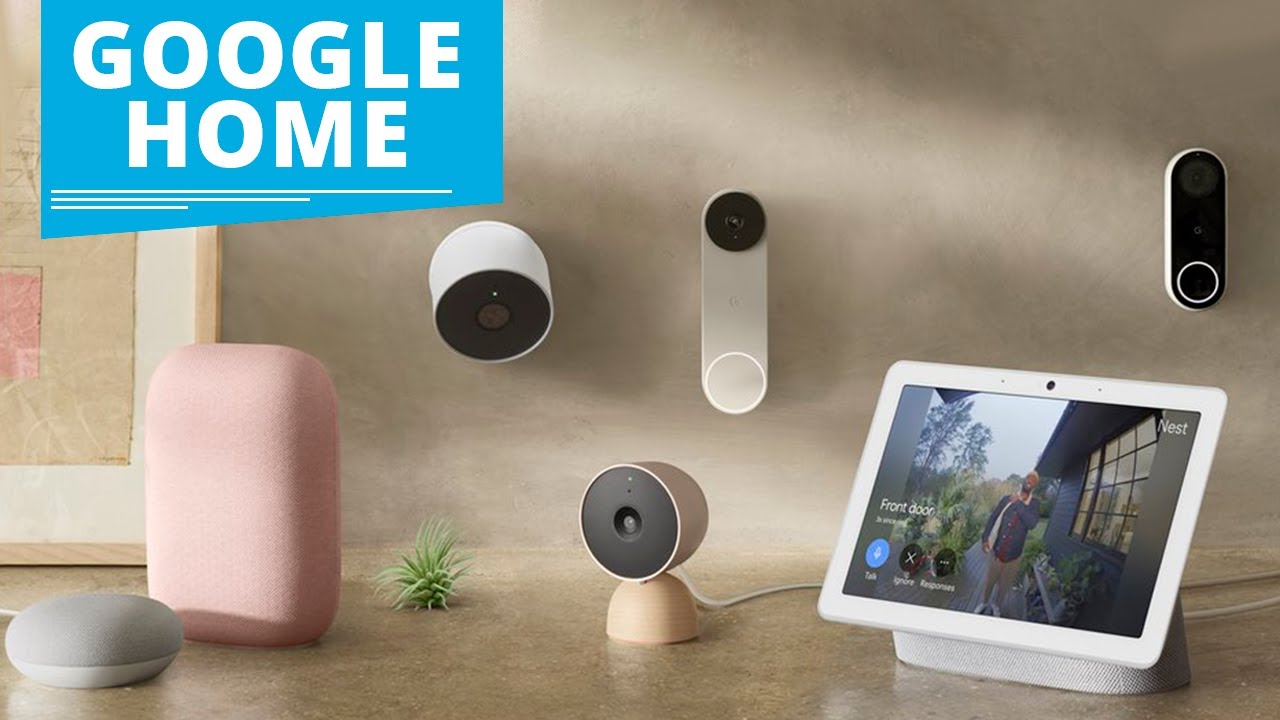
Enhanced Security and Peace of Mind: Smart home technology extends far beyond comfort. Integrating smart security cameras (Nest Cam, Arlo, Ring), smart doorbells (Nest Doorbell, Ring Video Doorbell), and smart locks (August, Yale) with your Google Home provides an unprecedented level of control and awareness. Wondering who’s at the door? "Hey Google, show me the front door camera." Left home and forgot to lock the door? "Hey Google, lock the front door." You can even set up routines that trigger lights or play sounds when motion is detected by your cameras, acting as a deterrent to potential intruders. This constant connection offers invaluable peace of mind, especially when you’re away.
-
Streamlined Entertainment: Your Google Home is already a hub for entertainment, but when integrated with smart TVs and streaming devices, its capabilities multiply. "Hey Google, play Stranger Things on Netflix on the living room TV." Or, "Hey Google, pause the movie." You can even create playlists that sync across devices, allowing you to seamlessly transition from listening to music on your smart speaker to watching a related video on your smart display.
-
Automated Routines for Ultimate Convenience: This is where the magic truly happens. Google Home’s "Routines" feature allows you to string together multiple commands into a single voice prompt or a scheduled event. Think of it as your personal butler.
-
Morning Routine: "Hey Google, good morning." This single command could:
- Turn on your bedroom lights.
- Adjust the thermostat to your wake-up temperature.
- Tell you the weather forecast.
- Read your calendar appointments.
- Start your favorite morning news podcast.
- Turn on the coffee maker (with a compatible smart plug).
-
Evening Routine: "Hey Google, good night." This could:
- Turn off all the lights in the house.
- Lock your smart doors.
- Arm your security system.
- Set your thermostat to a sleep-friendly temperature.
- Play a calming sleep sound.
-
"Leaving Home" Routine: "Hey Google, I’m leaving." This could:
- Turn off all lights.
- Turn down the thermostat.
- Lock the doors.
- Arm the security system.

These routines are fully customizable, allowing you to tailor your smart home experience to your unique lifestyle.
-
-
Energy Efficiency and Cost Savings: A smart home isn’t just about comfort; it’s about intelligence. Smart thermostats learn your habits and adjust heating and cooling to optimize energy usage, saving you money on your utility bills. Smart lighting can be programmed to turn off automatically when rooms are empty or during daylight hours. By integrating smart plugs with appliances, you can ensure they’re not drawing power unnecessarily when not in use. This conscious approach to energy consumption not only benefits your wallet but also the environment.
-
Accessibility for All: The voice-controlled nature of Google Home makes it an invaluable tool for individuals with mobility issues or visual impairments. Simple voice commands can control lights, appliances, entertainment systems, and even provide information, fostering greater independence and ease of living.
Getting Started: It’s Simpler Than You Think!
The most common misconception about smart homes is that they require complex installation and technical expertise. While some advanced setups might, the majority of Google Home-compatible devices are designed for plug-and-play simplicity.
-
The Foundation: Your Google Home Device: You already have the core component. Ensure it’s connected to your Wi-Fi network and set up in the Google Home app on your smartphone or tablet.
-
Choose Your Smart Devices: Start small. You don’t need to convert your entire house overnight. Consider one or two areas to begin with:
- Smart Lights: These are often the easiest entry point. Brands like Philips Hue, LIFX, or even more budget-friendly options like Wyze or TP-Link Kasa offer bulbs and light strips that are straightforward to install and connect.
- Smart Plugs: These inexpensive devices plug into your existing outlets, allowing you to control any "dumb" appliance plugged into them with your voice. Think coffee makers, fans, or lamps.
- Smart Thermostat: If you’re looking for significant energy savings and comfort control, a smart thermostat like the Nest Thermostat or Ecobee is a worthwhile investment. Installation can be a bit more involved, but many offer guided setup through their apps, and professional installation is readily available.
-
Download the Manufacturer’s App: Most smart devices come with their own mobile app. Download this app and follow the instructions to connect your new smart device to your home Wi-Fi network.
-
Link to Your Google Home App: This is the crucial step that brings everything together. Open your Google Home app, tap the "+" icon to add a new device, and select "Set up device." Choose "Works with Google" and search for the brand of your smart device. Follow the prompts to link your accounts.
-
Discover and Control: Once linked, your Google Home app will discover your new smart devices. You can then assign them to specific rooms (e.g., "Living Room Lamp," "Bedroom Fan") and start controlling them with your voice.
Expanding Your Smart Home Ecosystem:
As you become more comfortable, you can gradually expand your smart home:
- Smart Speakers and Displays: Adding more Google Nest devices to different rooms allows for voice control from anywhere in your home. A Google Nest Hub or Nest Hub Max can provide visual feedback, show camera feeds, and act as a central control panel.
- Smart Locks: For enhanced security, smart locks offer keyless entry and remote locking/unlocking.
- Smart Doorbells and Cameras: Gain awareness of who is at your door and monitor your property remotely.
- Smart Appliances: Many newer refrigerators, ovens, and washing machines now come with built-in smart capabilities that can integrate with Google Home.
- Smart Blinds and Curtains: Automate your window coverings for privacy, light control, and energy efficiency.
Troubleshooting Common Smart Home Hiccups:
While generally reliable, like any technology, smart homes can occasionally encounter issues.
- Connectivity Problems: Ensure your Wi-Fi network is strong and stable. Sometimes, simply restarting your router and modem can resolve connectivity issues.
- Device Not Responding: Check if the device is powered on and connected to your Wi-Fi. Try unlinking and relinking the device in the Google Home app.
- Voice Commands Not Understood: Speak clearly and directly to your Google Home device. Ensure the device is in a location where it can clearly hear you.
- Firmware Updates: Keep your Google Home app and the apps for your individual smart devices updated to ensure optimal performance and security.
The Future is Now: Embrace the Intelligent Home
The journey to a smart home powered by Google Home is an exciting and ongoing one. It’s about reclaiming your time, enhancing your security, and creating a living space that adapts to your needs. The initial investment is often surprisingly affordable, and the benefits are immeasurable.
Don’t let the complexity of "smart" deter you. Your Google Home is more than just a gadget; it’s your gateway to a future where your home works for you, intuitively and effortlessly. So, the next time you say, "Hey Google," remember the vast potential that lies dormant, waiting to be unleashed. The future of your home is not just smart; it’s intelligent, and it’s ready for you to discover. Start small, explore the possibilities, and prepare to be amazed at how your Google Home can truly transform your everyday life.




Leave a Comment
You must be logged in to post a comment.